**高并发、微服务 、性能调优实战案例100讲,所有案例均源于个人工作实战,均配合代码落地**
加我微信:itsoku,所有案例均提供在线答疑。
# 第78节 接口调用利器:RestTemplate,吃透它
非常实用的一节,先收藏点赞,慢慢看。
目前整个课程59块钱,100个案例,含所有源码 & 文档 & 技术支持,可点击左下角小黄车了解
# 1、RestTemplate概述
发送http请求,估计很多人用过 `httpclient` 和 `okhttp`,确实挺好用的
而 Spring 中的 `RestTemplate` 和这俩的功能类似,也是用来发送http请求的,不过用法上面比前面的2位要容易很多
本文给大家上 17 个案例,基本上涵盖了RestTemplate所有的用法。
# 2、案例代码(lesson078)
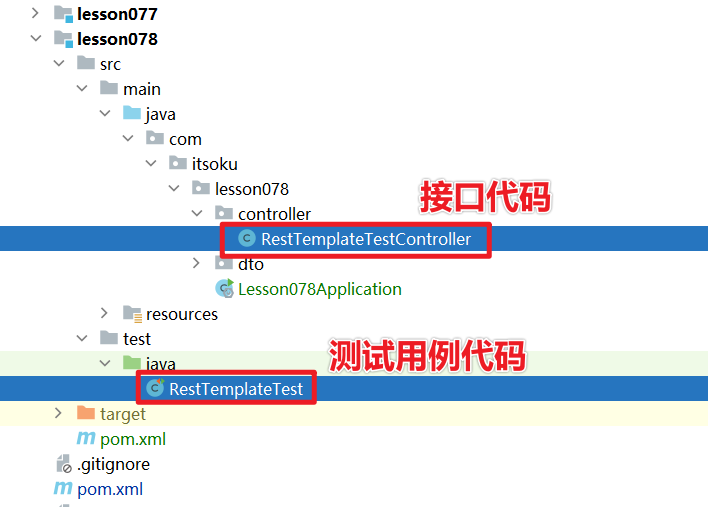
# 3、发送Get请求
## 3.1、普通请求
接口代码
```java
@GetMapping("/test/get")
@ResponseBody
public BookDto get() {
return new BookDto(1, "高并发 & 微服务 & 性能调优实战案例 100 讲");
}
@Data
@NoArgsConstructor
@AllArgsConstructor
public class BookDto {
private Integer id;
private String name;
}
```
使用RestTemplate调用上面这个接口,通常有2种写法,如下
```java
@Test
public void test1() {
RestTemplate restTemplate = new RestTemplate();
String url = "http://localhost:8080/test/get";
//getForObject方法,获取响应体,将其转换为第二个参数指定的类型
BookDto bookDto = restTemplate.getForObject(url, BookDto.class);
System.out.println(bookDto);
}
@Test
public void test2() {
RestTemplate restTemplate = new RestTemplate();
String url = "http://localhost:8080/test/get";
//getForEntity方法,返回值为ResponseEntity类型
// ResponseEntity中包含了响应结果中的所有信息,比如头、状态、body
ResponseEntity responseEntity = restTemplate.getForEntity(url, BookDto.class);
//状态码
System.out.println(responseEntity.getStatusCode());
//获取头
System.out.println("头:" + responseEntity.getHeaders());
//获取body
BookDto bookDto = responseEntity.getBody();
System.out.println(bookDto);
}
```
test1输出
```java
BookDto{id=1, name='高并发 & 微服务 & 性能调优实战案例 100 讲'}
```
test2输出
```java
200 OK
头:[Content-Type:"application/json;charset=UTF-8", Transfer-Encoding:"chunked", Date:"Sat, 02 Oct 2021 07:05:15 GMT", Keep-Alive:"timeout=20", Connection:"keep-alive"]
BookDto{id=1, name='高并发 & 微服务 & 性能调优实战案例 100 讲'}
```
## 3.2、url中含有动态参数
接口代码
```java
@GetMapping("/test/get/{id}/{name}")
@ResponseBody
public BookDto get(@PathVariable("id") Integer id, @PathVariable("name") String name) {
return new BookDto(id, name);
}
```
使用RestTemplate调用上面这个接口,通常有2种写法,如下
```java
@Test
public void test3() {
RestTemplate restTemplate = new RestTemplate();
//url中有动态参数
String url = "http://localhost:8080/test/get/{id}/{name}";
Map uriVariables = new HashMap<>();
uriVariables.put("id", "1");
uriVariables.put("name", "高并发 & 微服务 & 性能调优实战案例 100 讲");
//使用getForObject或者getForEntity方法
BookDto bookDto = restTemplate.getForObject(url, BookDto.class, uriVariables);
System.out.println(bookDto);
}
@Test
public void test4() {
RestTemplate restTemplate = new RestTemplate();
//url中有动态参数
String url = "http://localhost:8080/test/get/{id}/{name}";
Map uriVariables = new HashMap<>();
uriVariables.put("id", "1");
uriVariables.put("name", "高并发 & 微服务 & 性能调优实战案例 100 讲");
//getForEntity方法
ResponseEntity responseEntity = restTemplate.getForEntity(url, BookDto.class, uriVariables);
BookDto bookDto = responseEntity.getBody();
System.out.println(bookDto);
}
```
test3输出
```java
BookDto{id=1, name='高并发 & 微服务 & 性能调优实战案例 100 讲'}
```
test4输出
```java
BookDto{id=1, name='高并发 & 微服务 & 性能调优实战案例 100 讲'}
```
## 3.3、接口返回值为泛型
接口代码
```java
@GetMapping("/test/getList")
@ResponseBody
public List getList() {
return Arrays.asList(
new BookDto(1, "Spring高手系列"),
new BookDto(2, "高并发 & 微服务 & 性能调优实战案例 100 讲")
);
}
```
当接口的返回值为泛型的时候,这种情况比较特殊,使用RestTemplate调用上面这个接口,代码如下,需要用到`restTemplate.exchange`的方法,这个方法中有个参数是`ParameterizedTypeReference`类型,通过这个参数类指定泛型类型
```java
@Test
public void test5() {
RestTemplate restTemplate = new RestTemplate();
//返回值为泛型
String url = "http://localhost:8080/test/getList";
//若返回结果是泛型类型的,需要使用到exchange方法,
//这个方法中有个参数是ParameterizedTypeReference类型,通过这个参数类指定泛型类型
ResponseEntity> responseEntity =
restTemplate.exchange(url,
HttpMethod.GET,
null,
new ParameterizedTypeReference>() {
});
List bookDtoList = responseEntity.getBody();
System.out.println(bookDtoList);
}
```
输出
```java
[BookDto{id=1, name='Spring高手系列'}, BookDto{id=2, name='高并发 & 微服务 & 性能调优实战案例 100 讲'}]
```
## 3.4、下载小文件
接口代码如下,这个接口会下载服务器端的1.txt文件。
```java
/**
* 下载文件
*
* @return
*/
@GetMapping("/test/downFile")
@ResponseBody
public HttpEntity downFile() {
//将文件流封装为InputStreamResource对象
InputStream inputStream = this.getClass().getResourceAsStream("/1.txt");
InputStreamResource inputStreamResource = new InputStreamResource(inputStream);
//设置header
MultiValueMap headers = new HttpHeaders();
headers.add(HttpHeaders.CONTENT_DISPOSITION, "attachment;filename=1.txt");
HttpEntity httpEntity = new HttpEntity<>(inputStreamResource);
return httpEntity;
}
```
使用RestTemplate调用这个接口,代码如下,目前这个文件的内容比较少,可以直接得到一个数组。
```java
@Test
public void test6() {
RestTemplate restTemplate = new RestTemplate();
String url = "http://localhost:8080/test/downFile";
//文件比较小的情况,直接返回字节数组
ResponseEntity responseEntity = restTemplate.getForEntity(url, byte[].class);
//获取文件的内容
byte[] body = responseEntity.getBody();
String content = new String(body);
System.out.println(content);
}
```
注意:如果文件大的时候,这种方式就有问题了,会导致oom,要用下面的方式了。
## 3.5、下载大文件
接口代码,继续使用上面下载1.txt的代码
```java
/**
* 下载文件
*
* @return
*/
@GetMapping("/test/downFile")
@ResponseBody
public HttpEntity downFile() {
//将文件流封装为InputStreamResource对象
InputStream inputStream = this.getClass().getResourceAsStream("/1.txt");
InputStreamResource inputStreamResource = new InputStreamResource(inputStream);
//设置header
MultiValueMap headers = new HttpHeaders();
headers.add(HttpHeaders.CONTENT_DISPOSITION, "attachment;filename=1.txt");
HttpEntity httpEntity = new HttpEntity<>(inputStreamResource);
return httpEntity;
}
```
此时使用RestTemplate调用这个接口,代码如下
> 文件比较大的时候,比如好几个G,就不能返回字节数组了,会把内存撑爆,导致OOM,需要使用execute方法了,这个方法中有个ResponseExtractor类型的参数,restTemplate拿到结果之后,会回调{@link ResponseExtractor#extractData}这个方法,在这个方法中可以拿到响应流,然后进行处理,这个过程就是变读边处理,不会导致内存溢出
```java
@Test
public void test7() {
RestTemplate restTemplate = new RestTemplate();
String url = "http://localhost:8080/test/downFile";
/**
* 文件比较大的时候,比如好几个G,就不能返回字节数组了,会把内存撑爆,导致OOM
* 需要这么玩:
* 需要使用execute方法了,这个方法中有个ResponseExtractor类型的参数,
* restTemplate拿到结果之后,会回调{@link ResponseExtractor#extractData}这个方法,
* 在这个方法中可以拿到响应流,然后进行处理,这个过程就是变读边处理,不会导致内存溢出
*/
String result = restTemplate.execute(url,
HttpMethod.GET,
null,
new ResponseExtractor() {
@Override
public String extractData(ClientHttpResponse response) throws IOException {
System.out.println("状态:"+response.getStatusCode());
System.out.println("头:"+response.getHeaders());
//获取响应体流
InputStream body = response.getBody();
//处理响应体流
String content = IOUtils.toString(body, "UTF-8");
return content;
}
}, new HashMap<>());
System.out.println(result);
}
```
## 3.6、传递头
接口代码
```java
@GetMapping("/test/header")
@ResponseBody
public Map> header(HttpServletRequest request) {
Map> header = new LinkedHashMap<>();
Enumeration headerNames = request.getHeaderNames();
while (headerNames.hasMoreElements()) {
String name = headerNames.nextElement();
Enumeration values = request.getHeaders(name);
List list = new ArrayList<>();
while (values.hasMoreElements()) {
list.add(values.nextElement());
}
header.put(name, list);
}
return header;
}
```
使用RestTemplate调用接口,请求头中传递数据,代码如下,注意代码`①和②`,这两处是关键,用到了`HttpHeaders`和`RequestEntity`
> - 请求头放在HttpHeaders对象中
> - RequestEntity:请求实体,请求的所有信息都可以放在RequestEntity中,比如body部分、头、请求方式、url等信息
```java
@Test
public void test8() {
RestTemplate restTemplate = new RestTemplate();
String url = "http://localhost:8080/test/header";
//①:请求头放在HttpHeaders对象中
MultiValueMap headers = new HttpHeaders();
headers.add("header-1", "V1");
headers.add("header-2", "Spring");
headers.add("header-2", "SpringBoot");
//②:RequestEntity:请求实体,请求的所有信息都可以放在RequestEntity中,比如body部分、头、请求方式、url等信息
RequestEntity requestEntity = new RequestEntity(
null, //body部分数据
headers, //头
HttpMethod.GET,//请求方法
URI.create(url) //地址
);
ResponseEntity>> responseEntity = restTemplate.exchange(requestEntity,
new ParameterizedTypeReference>>() {
});
Map> result = responseEntity.getBody();
System.out.println(result);
}
```
输出
```json
{accept=[application/json, application/*+json], header-1=[V1], header-2=[Spring, SpringBoot], user-agent=[Java/1.8.0_121], host=[localhost:8080], connection=[keep-alive]}
```
## 3.7、综合案例:含头、url动态参数
接口
```java
@GetMapping("/test/getAll/{path1}/{path2}")
@ResponseBody
public Map getAll(@PathVariable("path1") String path1,
@PathVariable("path2") String path2,
HttpServletRequest request) {
Map result = new LinkedHashMap<>();
result.put("path1", path1);
result.put("path2", path2);
//头
Map> header = new LinkedHashMap<>();
Enumeration headerNames = request.getHeaderNames();
while (headerNames.hasMoreElements()) {
String name = headerNames.nextElement();
Enumeration values = request.getHeaders(name);
List list = new ArrayList<>();
while (values.hasMoreElements()) {
list.add(values.nextElement());
}
header.put(name, list);
}
result.put("header", header);
return result;
}
```
如下,使用RestTemplate调用接口,GET方式、传递header、path中动态参数。
```java
@Test
public void test9() {
RestTemplate restTemplate = new RestTemplate();
String url = "http://localhost:8080/test/getAll/{path1}/{path2}";
//①:请求头
MultiValueMap headers = new HttpHeaders();
headers.add("header-1", "V1");
headers.add("header-2", "Spring");
headers.add("header-2", "SpringBoot");
//②:url中的2个参数
Map uriVariables = new HashMap<>();
uriVariables.put("path1", "v1");
uriVariables.put("path2", "v2");
//③:HttpEntity:HTTP实体,内部包含了请求头和请求体
HttpEntity requestEntity = new HttpEntity(
null,//body部分,get请求没有body,所以为null
headers //头
);
//④:使用exchange发送请求
ResponseEntity> responseEntity = restTemplate.exchange(
url, //url
HttpMethod.GET, //请求方式
requestEntity, //请求实体(头、body)
new ParameterizedTypeReference>() {
},//返回的结果类型
uriVariables //url中的占位符对应的值
);
Map result = responseEntity.getBody();
System.out.println(result);
}
```
输出
```java
{path1=v1, path2=v2, header={accept=[application/json, application/*+json], header-1=[V1], header-2=[Spring, SpringBoot], user-agent=[Java/1.8.0_121], host=[localhost:8080], connection=[keep-alive]}}
```
# 4、发送POST请求
## 4.1、POST 请求常见的3种类型
http请求头中的Content-Type用来指定请求的类型,常见的有3种
| Content-Type | 说明 |
| --------------------------------- | ------------------------------------------------------------ |
| application/x-www-form-urlencoded | 页面中普通的form表单提交时就是这种类型,表单中的元素会按照名称和值拼接好,然后之间用&连接,格式如:p1=v1&p2=v2&p3=v3
然后通过urlencoded编码之后丢在body中发送 |
| multipart/form-data | 页面中表单上传文件的时候,用到的就是这种格式 |
| application/json | 将发送的数据转换为json格式,丢在http请求的body中发送,后端接口通常用@RequestBody配合对象来接收。 |
下面看则种方式的案例。
## 4.2、普通表单请求
普通表单默认为application/x-www-form-urlencoded类型的请求。
接口代码
```java
@PostMapping("/test/form1")
@ResponseBody
public BookDto form1(BookDto bookDto) {
return bookDto;
}
```
使用RestTemplate调用接口
```java
@Test
public void test10() {
RestTemplate restTemplate = new RestTemplate();
String url = "http://localhost:8080/test/form1";
//①:表单信息,需要放在MultiValueMap中,MultiValueMap相当于Map>
MultiValueMap body = new LinkedMultiValueMap<>();
//调用add方法填充表单数据(表单名称:值)
body.add("id","1");
body.add("name","高并发 & 微服务 & 性能调优实战案例 100 讲");
//②:发送请求(url,请求体,返回值需要转换的类型)
BookDto result = restTemplate.postForObject(url, body, BookDto.class);
System.out.println(result);
}
```
如果想携带头信息,代码如下
```java
@Test
public void test11() {
RestTemplate restTemplate = new RestTemplate();
String url = "http://localhost:8080/test/form1";
//①:表单信息,需要放在MultiValueMap中,MultiValueMap相当于Map>
MultiValueMap body = new LinkedMultiValueMap<>();
//调用add方法放入表单元素(表单名称:值)
body.add("id","1");
body.add("name","高并发 & 微服务 & 性能调优实战案例 100 讲");
//②:请求头
HttpHeaders headers = new HttpHeaders();
//调用set方法放入请求头
headers.set(HttpHeaders.CONTENT_TYPE, MediaType.APPLICATION_FORM_URLENCODED_VALUE);
//③:请求实体:包含了请求体和请求头
HttpEntity> httpEntity = new HttpEntity<>(body, headers);
//④:发送请求(url,请求实体,返回值需要转换的类型)
BookDto result = restTemplate.postForObject(url, httpEntity, BookDto.class);
System.out.println(result);
}
```
## 4.3、上传本地文件
上传文件Content-Type为multipart/form-data 类型。
接口如下,上传上传单个文件,返回值为一个Map类型,是泛型类型
```java
@PostMapping(value = "/test/form2")
@ResponseBody
public Map form2(@RequestParam("file1") MultipartFile file1) {
Map fileMetadata = new LinkedHashMap<>();
fileMetadata.put("文件名", file1.getOriginalFilename());
fileMetadata.put("文件类型", file1.getContentType());
fileMetadata.put("文件大小(byte)", String.valueOf(file1.getSize()));
return fileMetadata;
}
```
使用RestTemplate调用接口,主要下面代码`②`上传的文件需要包装为`org.springframework.core.io.Resource`,常用的有3中[FileSystemResource、InputStreamResource、ByteArrayResource],这里案例中我们用到的是FileSystemResource来上传本地文件,另外2种(InputStreamResource、ByteArrayResource)用法就比较特殊了,见下个案例。
```java
@Test
public void test12() {
RestTemplate restTemplate = new RestTemplate();
String url = "http://localhost:8080/test/form2";
//①:表单信息,需要放在MultiValueMap中,MultiValueMap相当于Map>
MultiValueMap body = new LinkedMultiValueMap<>();
//调用add方法放入表单元素(表单名称:值)
//②:文件对应的类型,需要是org.springframework.core.io.Resource类型的,常见的有[InputStreamResource,ByteArrayResource]
String filePath = ".\\lesson078\\src\\main\\java\\com\\itsoku\\lesson078\\dto\\UserDto.java";
body.add("file1", new FileSystemResource(filePath));
//③:头
HttpHeaders headers = new HttpHeaders();
headers.add("header1", "v1");
headers.add("header2", "v2");
//④:请求实体
RequestEntity> requestEntity = new RequestEntity<>(body, headers, HttpMethod.POST, URI.create(url));
//⑤:发送请求(请求实体,返回值需要转换的类型)
ResponseEntity> responseEntity = restTemplate.exchange(
requestEntity,
new ParameterizedTypeReference>() {
});
Map result = responseEntity.getBody();
System.out.println(result);
}
```
## 4.4、通过流或字节数组的方式上传文件
> 有时候,上传的文件是通过流的方式或者字节数组的方式,那么就需要用到InputStreamResource、ByteArrayResource这俩了。
>
> **注意:**使用这俩的时候,需要重写2个方法,否则会上传失败
>
> - getFilename:文件名称
> - contentLength:长度
```java
@Test
public void test13() {
RestTemplate restTemplate = new RestTemplate();
String url = "http://localhost:8080/test/form2";
//①:表单信息,需要放在MultiValueMap中,MultiValueMap相当于Map>
MultiValueMap body = new LinkedMultiValueMap<>();
/**
* ②:通过流的方式上传文件,流的方式需要用到InputStreamResource类,需要重写2个方法
* getFilename:文件名称
* contentLength:长度
*/
InputStream inputStream = RestTemplateTest.class.getResourceAsStream("/1.txt");
InputStreamResource inputStreamResource = new InputStreamResource(inputStream) {
@Override
public String getFilename() {
return "1.txt";
}
@Override
public long contentLength() throws IOException {
return inputStream.available();
}
};
body.add("file1", inputStreamResource);
//③:头
HttpHeaders headers = new HttpHeaders();
headers.add("header1", "v1");
headers.add("header2", "v2");
//④:请求实体
RequestEntity> requestEntity = new RequestEntity<>(body, headers, HttpMethod.POST, URI.create(url));
//⑤:发送请求(请求实体,返回值需要转换的类型)
ResponseEntity> responseEntity = restTemplate.exchange(
requestEntity,
new ParameterizedTypeReference>() {
});
Map result = responseEntity.getBody();
System.out.println(result);
}
```
## 4.5、复杂表单:多个普通元素+多文件上传
接口
```java
/**
* 复杂的表单:包含了普通元素、多文件
*
* @param userDto
* @return
*/
@PostMapping("/test/form3")
@ResponseBody
public Map form3(UserDto userDto) {
Map result = new LinkedHashMap<>();
result.put("name", userDto.getName());
result.put("headImg", userDto.getHeadImg().getOriginalFilename());
result.put("idImgList", Arrays.toString(userDto.getIdImgList().stream().
map(MultipartFile::getOriginalFilename).toArray()));
return result;
}
```
UserDto:包含了多个元素(姓名、头像、多张证件照),这种可以模拟复杂的表单
```java
@Data
@NoArgsConstructor
@AllArgsConstructor
public class UserDto {
//姓名
private String name;
//头像
private MultipartFile headImg;
//多张证件照
private List idImgList;
}
```
用RestTemplate调用这个接口,代码如下
```java
@Test
public void test14() {
RestTemplate restTemplate = new RestTemplate();
String url = "http://localhost:8080/test/form3";
//①:表单信息,需要放在MultiValueMap中,MultiValueMap相当于Map>
MultiValueMap body = new LinkedMultiValueMap<>();
body.add("name", "路人");
body.add("headImg", new FileSystemResource(".\\lesson078\\src\\main\\resources\\1.jpg"));
//来2张证件照,元素名称一样
body.add("idImgList", new FileSystemResource(".\\lesson078\\src\\main\\resources\\2.jpg"));
body.add("idImgList", new FileSystemResource(".\\lesson078\\src\\main\\resources\\3.jpg"));
//③:头
HttpHeaders headers = new HttpHeaders();
headers.add("header1", "v1");
headers.add("header2", "v2");
//④:请求实体
RequestEntity> requestEntity = new RequestEntity<>(body, headers, HttpMethod.POST, URI.create(url));
//⑤:发送请求(请求实体,返回值需要转换的类型)
ResponseEntity> responseEntity = restTemplate.exchange(
requestEntity,
new ParameterizedTypeReference>() {
});
Map result = responseEntity.getBody();
System.out.println(result);
}
```
输出
```java
{name=路人, headImg=1.jpg, idImgList=[2.jpg, 3.jpg]}
```
## 4.6、发送json格式数据:传递java对象
接口
```java
/**
* body中json格式的数据,返回值非泛型
*
* @param bookDto
* @return
*/
@PostMapping("/test/form4")
@ResponseBody
public BookDto form4(@RequestBody BookDto bookDto) {
return bookDto;
}
```
RestTemplate调用接口
```java
@Test
public void test15() {
RestTemplate restTemplate = new RestTemplate();
String url = "http://localhost:8080/test/form4";
BookDto body = new BookDto(1, "高并发 & 微服务 & 性能调优实战案例 100 讲");
BookDto result = restTemplate.postForObject(url, body, BookDto.class);
System.out.println(result);
}
```
输出
```
BookDto{id=1, name='高并发 & 微服务 & 性能调优实战案例 100 讲'}
```
## 4.7、发送json格式数据:传递java对象,返回值为泛型
接口
```java
/**
* body中json格式的数据,返回值为泛型
*
* @param bookDtoList
* @return
*/
@PostMapping("/test/form5")
@ResponseBody
public List form5(@RequestBody List bookDtoList) {
return bookDtoList;
}
```
用RestTemplate调用这个接口,代码如下
```java
@Test
public void test16() {
RestTemplate restTemplate = new RestTemplate();
String url = "http://localhost:8080/test/form5";
//①:请求体,发送的时候会被转换为json格式数据
List body = Arrays.asList(
new BookDto(1, "高并发 & 微服务 & 性能调优实战案例 100 讲"),
new BookDto(2, "MySQL系列"));
//②:头
HttpHeaders headers = new HttpHeaders();
headers.add("header1", "v1");
headers.add("header2", "v2");
//③:请求实体
RequestEntity requestEntity = new RequestEntity(body, headers, HttpMethod.POST, URI.create(url));
//④:发送请求(请求实体,返回值需要转换的类型)
ResponseEntity> responseEntity = restTemplate.exchange(
requestEntity,
new ParameterizedTypeReference>() {
});
//⑤:获取结果
List result = responseEntity.getBody();
System.out.println(result);
}
```
输出
```java
[BookDto{id=1, name='高并发 & 微服务 & 性能调优实战案例 100 讲'}, BookDto{id=2, name='MySQL系列'}]
```
## 4.8、发送json字符串格式数据
上面2个json案例body都是java对象,RestTemplate默认自动配上Content-Type=application/json
但是如果body的值是json格式字符串的时候,调用的时候需要在头中明确指定Content-Type=application/json,写法如下:
```java
@Test
public void test17() {
RestTemplate restTemplate = new RestTemplate();
String url = "http://localhost:8080/test/form5";
//①:请求体为一个json格式的字符串
String body = "[{\"id\":1,\"name\":\"高并发 & 微服务 & 性能调优实战案例 100 讲\"},{\"id\":2,\"name\":\"MySQL系列\"}]";
/**
* ②:若请求体为json字符串的时候,需要在头中设置Content-Type=application/json;
* 若body是普通的java类的时候,无需指定这个,RestTemplate默认自动配上Content-Type=application/json
*/
HttpHeaders headers = new HttpHeaders();
headers.setContentType(MediaType.APPLICATION_JSON);
//③:请求实体(body,头、请求方式,uri)
RequestEntity requestEntity = new RequestEntity(body, headers, HttpMethod.POST, URI.create(url));
//④:发送请求(请求实体,返回值需要转换的类型)
ResponseEntity> responseEntity = restTemplate.exchange(
requestEntity,
new ParameterizedTypeReference>() {
});
//⑤:获取结果
List result = responseEntity.getBody();
System.out.println(result);
}
```
输出
```java
[BookDto{id=1, name='高并发 & 微服务 & 性能调优实战案例 100 讲'}, BookDto{id=2, name='MySQL系列'}]
```
# 5、DELETE、PUT、OPTION请求
## 5.1、DELETE请求
```java
public void delete(String url, Object... uriVariables);
public void delete(String url, Map uriVariables);
public void delete(URI url);
```
## 5.2、PUT请求
PUT请求和POST请求类似,将类型改为PUT就可以了。
## 5.3、OPTIONS请求
> OPTIONS请求用来探测接口支持哪些http方法
```java
public Set optionsForAllow(String url, Object... uriVariables);
public Set optionsForAllow(String url, Map uriVariables);
public Set optionsForAllow(URI url);
```
# 获取,源码 & 文档 & 技术支持
代码在lesson078模块中,需要的小伙伴可以加我微信:itsoku,获取。
# 高并发 & 微服务 & 性能调优实战案例100讲
## 已更新 78 节课
目前整个课程59块钱,含所有源码 & 文档 & 技术支持,一杯咖啡的价格,还没下手的朋友,赶紧了。
```java
1. 分片上传实战
2. 通用并发处理工具类实战
3. 实现一个好用接口性能压测工具类
4. 超卖问题的4种解决方案,也是防止并发修改数据出错的通用方案
5. Semaphore实现接口限流实战
6. 并行查询,优化接口响应速度实战
7. 接口性能优化之大事务优化
8. 通用的Excel动态导出功能实战
9. 手写线程池管理器,管理&监控所有线程池
10. 动态线程池
11. SpringBoot实现动态Job实战
12. 并行查询,性能优化利器,可能有坑
13. 幂等的4种解决方案,吃透幂等性问题
14. 接口通用返回值设计与实现
15. 接口太多,各种dto、vo不计其数,如何命名?
16. 一个业务太复杂了,方法太多,如何传参?
17. 接口报错,如何快速定位日志?
18. 线程数据共享必学的3个工具类:ThreadLocal、InheritableThreadLocal、TransmittableThreadLocal
19. 通过AOP统一打印请求链路日志,排错效率飞升
20. 大批量任务处理常见的方案(模拟余额宝发放收益)
21. 并发环境下,如何验证代码是否正常?
22. MySql和Redis数据一致性
23. SpringBoot数据脱敏优雅设计与实现
24. 一行代码搞定系统操作日志
25. Aop简化MyBatis分页功能
26. ThreadLocal 遇到线程池有大坑 & 通用解决方案
27. SpringBoot读写分离实战(一个注解搞定读写分离 && 强制路由主库)
28. MQ专题-MQ典型的使用场景
29. MQ专题-如何确保消息的可靠性
30. MQ专题-SpringBoot中,手把手教你实现事务消息
31. 手写一个好用的延迟任务处理工具类
32. MQ专题-MQ延迟消息通用方案实战
33. MQ消息幂等消费 & 消费失败衰减式重试通用方案 & 代码 & 文档
34. MQ专题:顺序消息通用方案实战 & 代码落地 & 文档
35. MQ专题:消息积压相关问题及解决思路
36. 分布式事务-MQ最终一致性-实现跨库转账(案例+源码+文档)
37. 分布式事务-MQ最终一致性-实现电商账户余额提现到微信钱包(案例+源码+文档)
38. 分布式事务:通用的TCC分布式事务生产级代码落地实战
39. 分布式锁详解
40. 分享一个特别好用的Redissson分布式锁工具类
41. 一个注解轻松搞定分布式锁
42. 微服务中如何传递公共参数?
43. 接口幂等,通用方案 & 代码落地
44. 微服务链路日志追踪实战
45. 接口测试利器HTTP Client,不用Postman也可以
46. 封装MyBatis,实现通用无SQL版CRUD功能ORM框架
47. MyBatisPlus 轻松实现多租户数据隔离
48. 电商系统-资金账户表设计 及 应用实战
49. UML画图神器:PlantUML,画图效率飞升
50. 多线程事务,3秒插入百万数据
51. SpringBoot中自动初始化数据库功能,非常好用
52. SpringBoot优雅停机
53. 分享一个特好用的集合工具类,开发效率轻松翻倍
54. 性能调优:线程死锁相关问题
55. 如何排查OOM?
56. cpu飙升,如何快速排查?
57. cpu飙升,使用Arthas,3秒定位问题
58. 接口响应慢,使用Arthas,3秒定位问题代码
59. 策略模式,轻松消除ifelse代码
60. 生产上,代码未生效,如何排查?
61. 使用MySQL,实现一个高性能,分布式id生成器
62. 方法执行异常,使用arthas,快速定位问题
63. 扫码登录详解
64. 使用hutool生成&解析二维码,太方便了
65. SpringBoot中,redis中实现排行榜
66. SpringBoot中,Redis如何实现查找附近的人功能?
67. SpringBoot中,接口签名,通用方案,一次性搞懂
68. SpringBoot中,接口加解密,通用方案实战
69. 分库、分表、分库分表,如何选择?
70. 分库分表:分表字段如何选择?
71. 分库分表:分表数量为什么建议是2的n次方?
72. 分库分表:如何平滑迁移数据?
73. 并发编程有多难?值得反复研究的一个案例
74. 使用Redis Pipeline,接口性能提升10倍
75. 电商中,重复支付如何解决?
76. 千万级数据,全表update的正确姿势
77. 优雅实现树形菜单,适用于所有树,太好用了
78. 接口调用利器:RestTemplate,吃透它
```
## 课程部分大纲,连载中。。。。
以下课程均来源于个人多年的实战,均提供原理讲解 && 源码落地
1. 分片上传实战
2. 通用并发处理工具类实战
3. 实现一个好用接口性能压测工具类
4. 超卖问题的4种解决方案,也是防止并发修改数据出错的通用方案
5. Semaphore实现接口限流实战
6. 并行查询,优化接口响应速度实战
7. 接口性能优化之大事务优化
8. 通用的Excel动态导出功能实战
9. 手写线程池管理器,管理&监控所有线程池
10. 动态线程池
11. SpringBoot实现动态Job实战
12. 并行查询,性能优化利器,可能有坑
13. 幂等的4种解决方案,吃透幂等性问题
14. 接口通用返回值设计与实现
15. 接口太多,各种dto、vo不计其数,如何命名?
16. 一个业务太复杂了,方法太多,如何传参?
17. 接口报错,如何快速定位日志?
18. 线程数据共享必学的3个工具类:ThreadLocal、InheritableThreadLocal、TransmittableThreadLocal
19. 通过AOP统一打印请求链路日志,排错效率飞升
20. 大批量任务处理常见的方案(模拟余额宝发放收益)
21. 并发环境下,如何验证代码是否正常?
22. MySql和Redis数据一致性
23. SpringBoot数据脱敏优雅设计与实现
24. 一行代码搞定系统操作日志
25. Aop简化MyBatis分页功能
26. ThreadLocal 遇到线程池有大坑 & 通用解决方案
27. SpringBoot读写分离实战(一个注解搞定读写分离 && 强制路由主库)
28. MQ专题:MQ典型的7种使用场景
29. MQ专题:如何确保消息的可靠性
30. MQ专题:SpringBoot中,手把手教你实现事务消息
31. 手写一个好用的延迟任务处理工具类
32. MQ专题:延迟消息通用方案实战
33. MQ专题:消息幂等消费 & 消费失败自动重试通用方案 & 代码落地
34. MQ专题:顺序消息通用方案实战
35. MQ专题:消息积压问题
36. 分布式事务-MQ最终一致性-实现跨库转账(案例+源码+文档)
37. 分布式事务-MQ最终一致性-实现电商账户余额提现到微信钱包(案例+源码+文档)
38. 分布式事务:通用的TCC分布式事务生产级代码落地实战
39. 分布式锁详解
40. 分享一个特别好用的Redissson分布式锁工具类
41. 分布式锁:一个注解轻松实现布式锁
42. 微服务中如何传递上下文?实战
43. 接口幂等,通用方案 & 代码落地
44. 微服务链路日志追踪实战
45. 接口测试利器HTTP Client,不用Postman也可以
46. 封装MyBatis,实现通用无SQL版CRUD功能
47. MyBatisPlus 轻松实现 多租户数据隔离
48. 电商系统-资金账户表设计 及 应用实战
49. 开发者必须掌握的一款UML画图工具,画图效率飞升
50. 多线程事务,3秒插入百万数据
51. SpringBoot自动初始化数据库功能,太好用了
52. SpringBoot优雅停机
53. 分享一个特别好用的集合工具类,开发效率大幅提升
54. 性能调优:如何排查死锁?
55. 如何排查OOM?
56. cpu飙升,如何快速排查?
57. cpu飙升,使用Arthas,3秒定位问题
58. 接口响应慢,使用Arthas,3秒定位问题代码
59. 策略模式,轻松消除ifelse代码
60. 生产上,代码未生效,如何排查?
61. 使用MySQL,实现一个高性能,分布式id生成器
62. 方法执行异常,使用arthas,快速定位问题
63. 扫码登录详解
64. 使用hutool生成&解析二维码,太方便了
65. SpringBoot中,Redis如何实现排行榜功能?
66. SpringBoot中,Redis如何实现查找附近的人功能?
67. SpringBoot中,接口签名,通用方案,一次性搞懂
68. SpringBoot中,接口加解密,通用方案实战
69. 分库、分表、分库分表,如何选择?
70. 分库分表:分表字段如何选择?
71. 分库分表:分表数量为什么建议是2的n次方?
72. 分库分表:如何平滑迁移数据?
73. 并发编程有多难?值得反复研究的一个案例
74. 使用Redis Pipeline,接口性能提升10倍
75. 电商系统中,如何解决重复支付?
76. 千万级数据,全表update的正确姿势
77. 优雅实现树形菜单,适用于所有树,太好用了
78. 接口调用利器:RestTemplate,吃透它
79. 更多实战案例详解